Email Migration Basics – PST to MBOX Conversion Demystified
Email migration has become most important for modern businesspersonal communication management. No matter, whether you are moving from MS Outlook to Mozilla thunderbird, SeaMonkey, Apple Mailanother MBOX Supported email clients, migrating mailbox dat
Email migration has become most important for modern business and personal communication management. No matter whether you are moving from MS Outlook to Mozilla Thunderbird, SeaMonkey, Apple Mail, or another MBOX-supported email client, migrating mailbox data, including emails, contacts, calendars, tasks, notes, etc safely is one of the biggest challenges. Microsoft Outlook uses PST (Personal Storage Table) files for storing its mailbox data, whereas other mail clients store their mailbox information in MBOX format. Since there is no compatibility between these two file formats, a user needs to have a good solution for converting PST to MBOX.
The Professional VSPL PST to MBOX Converter does all the work easily and quickly by allowing its users to convert Outlook mailbox data into MBOX format without any loss of emails, attachments, contacts, or folder structure. There is no need to use time-consuming manual techniques involving many applications in order to migrate mailboxes; dedicated converter software allows to do that in a safe, quick, and easy way.
Understanding PST and MBOX File Formats
Microsoft Outlook maintains emails, calendars, contacts, journals, tasks, and notes within PST files. PST files are made especially for Microsoft Outlook and are often utilized to back up emails, archive emails, and store emails in offline mailboxes. Unfortunately, PST files cannot be accessed through email clients that use the MBOX file format.
MBOX is an open mailbox file format utilized by Mozilla Thunderbird, Apple Mail, Eudora, Entourage, SeaMonkey, Opera Mail, Spicebird, and various other email software. As these programs cannot natively handle PST files, an Outlook to MBOX Converter becomes necessary for the successful migration of the mailbox.
Why Users Need PST to MBOX Conversion
There are several conditions where users decide to perform Outlook PST to MBOX Conversion. Some organizations migrate from MS Outlook to an open-source email client to reduce software costs. Other users prefer MBOX Thunderbird because of its customization facilities, while Apple Mail users require MBOX Compatibility after moving to Mac OS.
Businesses also Export Outlook mailboxes for long- term email archiving, cloud migration, and forensic investigation. Regardless of the reason, the main goal is always to maintain mailbox integrity while converting data between two platforms.
Challenges of Manual Email Migration
Many users initially look for free ways to convert Outlook to MBOX, but manual processes usually require multiple applications and technical know-how. This process can take much time and increase the risk of data loss; it will not preserve folders and subfolders structure or perform an incomplete conversion.
Manual methods frequently include converting Outlook data to intermediate formats and then importing it to MBOX Thunderbird or another email client.This process becomes even more complicated when dealing with large mailbox files containing thousands of emails and attachments.
Professional software does the entire migration automatically, ensuring complete accuracy of data, eliminating these complications.
How VSPL PST to MBOX Converter Simplifies Migration
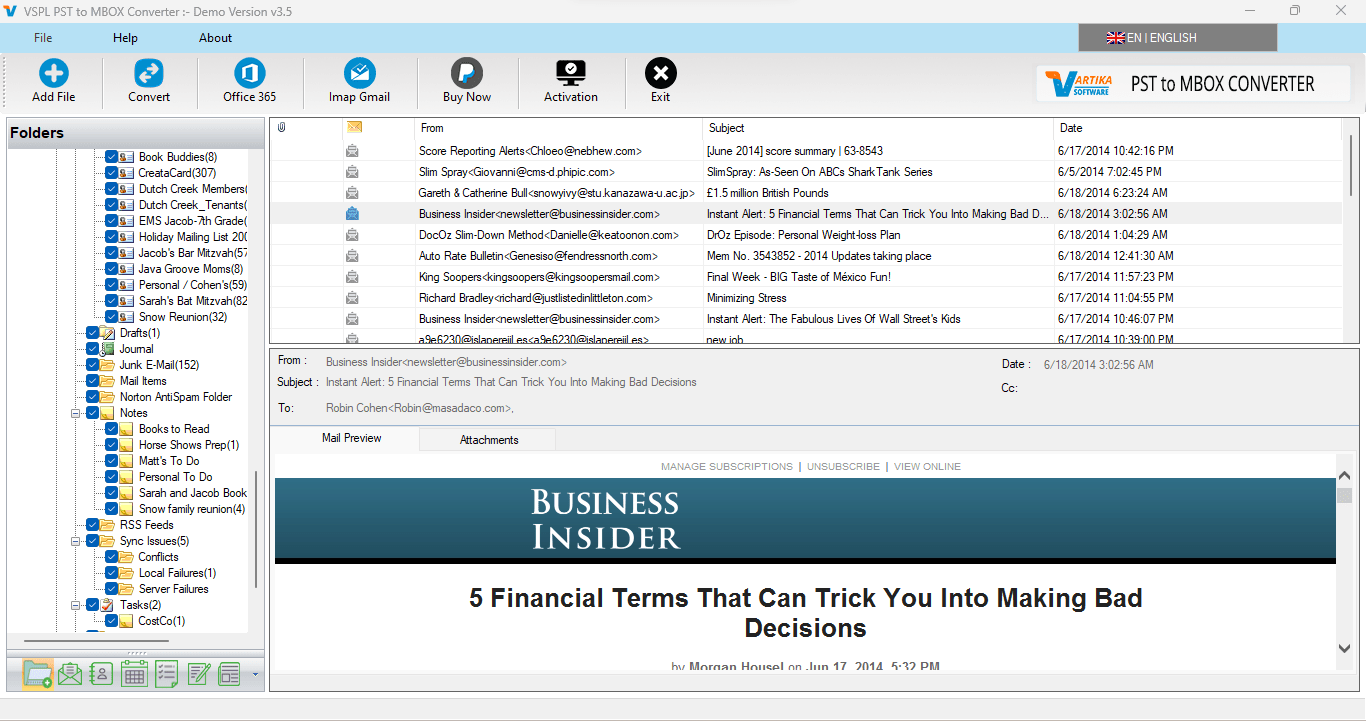
The VSPL PST to MBOX Converter is a specially designed application that lets users of all levels convert Outlook mailboxes easily. The software scans Outlook PST files, previews mailbox content, and directly converts emails to MBOX format, keeping every mailbox component intact.
Users just need to add their PST files, select the required mailbox folders, select the destination location, and start the conversion. The software automatically does the mailbox without changing the original PST file.
Such a streamlined workflow saves a lot of time for migration and provides reliable results.
Preserve Complete Mailbox Data
Data integrity is one of the biggest problems of email migration. A professional MBOX Converter method keeps all the mailbox items intact during the conversion.
Emails, attachments, contacts, calendars, tasks, journals, notes, sender info, recipient info, CC, BCC, timestamps, embedded images, internet headers, and email formatting are all intact. The folder hierarchy is also preserved exactly as it appears in Microsoft Outlook, so users will be able to access their mailbox in the same organized structure after migration.
Convert Single or Multiple PST Files
Many organizations have multiple Outlook data files, for different users or departments. That would take a lot of time to do each PST one at a time.
VSPL PST to MBOX Converter supports single and bulk migration. The software provides PST to MBOX Conversion for bulk conversion of PST files at a time. This is especially useful for IT administrators who are managing enterprise mailbox migration projects.
Preview Emails Before Conversion
Users can preview the mailbox folders and emails individually in the software interface before starting the migration.
This preview option lets users see the contents of the mailboxes, view attachments and verify that the right folder has been chosen before the conversion process starts. and it decreases the chances of exporting unwanted mailbox data.
Selective Email Migration
You do not always need to migrate a complete Outlook mailbox. Sometimes, users want to receive emails only from a particular project, department, or period.
The date filtering option comes with an advanced technology option that allows you to convert only the selected mailboxes and emails from a PST File to an MBOX file. It lets you specify a start and end date to include only relevant emails in the final MBOX File. This selective conversion process helps to save time and storage.
Direct PST to Thunderbird Migration
Many Outlook users migrate exactly to Mozilla Thunderbird because of its suppleness and open-source ecosystem.
The software supports PST to Thunderbird migration by converting Outlook PST files into MBOX format compatible with Thunderbird mailboxes. This eliminates complicated manual import procedures and allows users to continue working with their emails immediately after migration.
The entire mailbox structure, including folders and attachments, remains fully accessible inside Thunderbird.
Supports Large Outlook Data Files
Mozilla Thunderbird's flexibility and open-source ecosystem are a major reason why many Outlook users make the switch.
The software helps to migrate PST to Thunderbird by converting Outlook PST files to MBOX format which is compatible with Thunderbird mailboxes. This removes complex manual import procedures and allows users to immediately work with their emails after migration.
The entire mailbox structure (folders and attachments) is fully accessible within Thunderbird.
User-Friendly Interface
Today, many business mailboxes contain gigabytes of email data accumulated over many years.
The MBOX Converter Outlook has been designed with the ability to convert large size PST files without any file size restrictions. With advanced conversion algorithms, you get a stable performance even when converting thousands of emails with attachments.
This makes the software suitable for both enterprise level migration projects and personal mailbox Conversion.
Broad Compatibility
A good email migration tool should be compatible with older and newer versions of Outlook.
The software is compatible with Outlook 2021, Outlook 2019, Outlook 2016, Outlook 2013, Outlook 2010, Outlook 2007 and earlier versions. It is also compatible with all the major Windows operating systems including Windows 11, Windows 10, Windows 8.1, Windows 8, Windows 7 and Windows Server editions.
The generated MBOX files are compatible to Thunderbird, Apple Mail, SeaMonkey, Eudora, Entourage, Opera Mail, Spicebird and many other MBOX supported email clients.
Why Choose Professional Conversion Software?
Professional software has some advantages over manual methods of migration. It reduces the migration time, minimises the chances of data loss, retains the mailbox format, supports large Outlook files, and performs accurate bulk conversion.
This software converts the complete PST to MBOX Conversion in one interface without using multiple applications like free methods and preserves the mailbox integrity from start to end.
Businesses can boost productivity and home users can enjoy the simplicity and reliability of the conversion process.
Conclusion
Switching from Microsoft Outlook to an MBOX-based email client doesn’t have to be hard. A professional VSPL PST to MBOX Converter is a reliable and efficient solution to Convert Outlook to MBOX while keeping emails, attachments, contacts, calendars and complete folder hierarchy.
Planning PST to Thunderbird migration, moving to Apple Mail or archiving Outlook mailbox data in MBOX format, choose a trustworthy Outlook to MBOX Converter ensures accurate and trouble free results. The software provides bulk migration, preview feature, selective conversion, large PST files and wider compatibility thus making each aspect of PST to MBOX Conversion easier than ever and simplifying email migration.
Email Migration Basics – PST to MBOX Conversion Demystified Comments





