How to Move MSG Emails into Outlook PST for Easy Mailbox Management?
MSG files are used for saving emails in order to keep them safe in future. But when there are many MSG files, it becomes a problem for the users to handle them separately
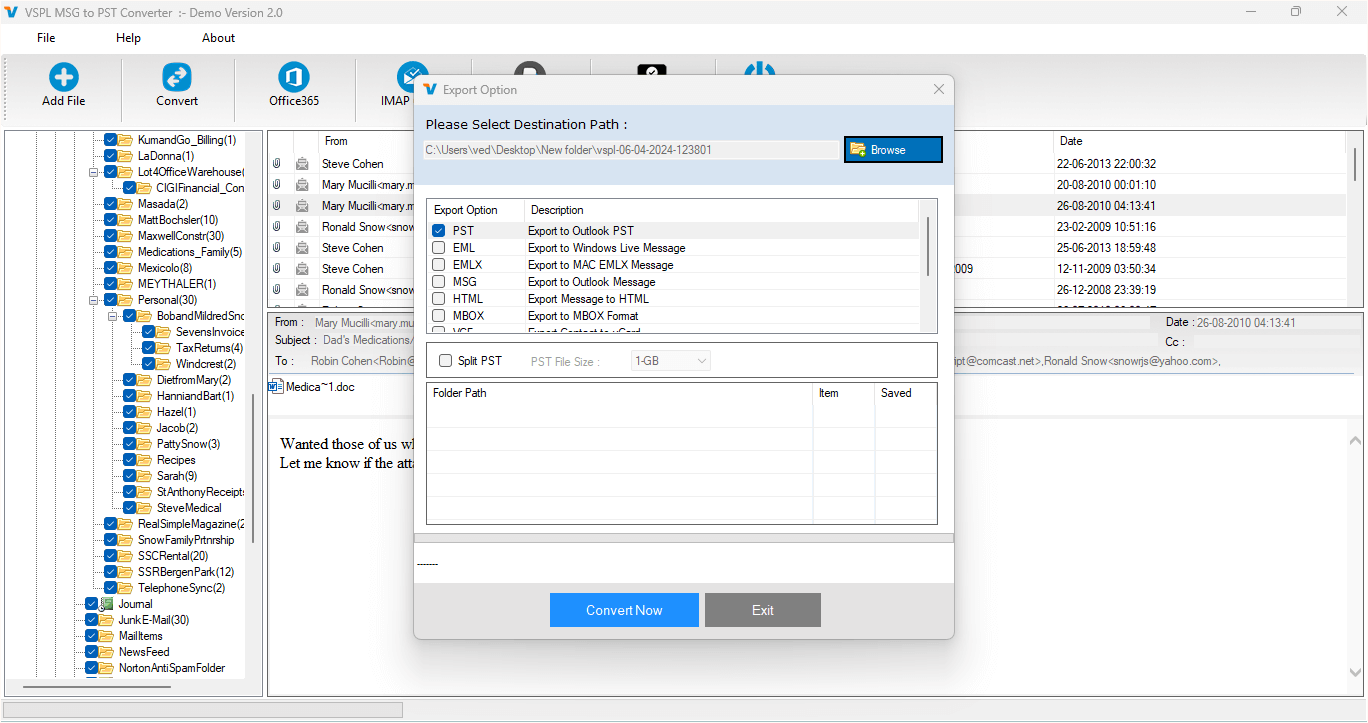
MSG files are used for saving emails in order to keep them safe in the future. But when there are many MSG files, it becomes a problem for users to handle them separately. Users save many MSG files in different locations and drives, making it difficult to find and manage email data across locations. In this case, using a PST file will be more helpful for managing the Outlook mailbox.
PST files are those in which many emails can be saved in one centralized data file of Outlook. Hence, users who have many individual MSG files need to use a good MSG to PST converter to consolidate their email data. VSPL software is used by users to convert multiple MSG files to PST files.
When Does MSG to PST Conversion Become Necessary?
Imagine a case wherein a user has stored numerous Outlook emails as separate MSG files over many years. The emails could have contained information related to communication with clients, projects, invoices, attachments, and other business documents. While it is possible to open individual emails in MSG format, doing this for hundreds of emails is neither practical nor efficient.
Converting the files into PST files could address the problem and convert the emails into one consolidated PST file. With the creation of the PST file, the emails would become more manageable in Outlook.
MSG Converter becomes handy in this case as it allows users to process numerous MSG files at once. There is no need to move all the individual emails since users can just choose the needed MSG files or folders and start the conversion.
A More Organized Way to Handle Multiple MSG Files
The main benefit of creating PST files from MSG files is proper organization. In case there is a lot of MSG files in some directory, it might become hard to deal with all of them. The name of the file may sometimes fail to convey the message content, and finding the needed email may be quite a time-consuming process.
There is an option for batch conversion provided by this program, which means that multiple MSG files can be converted into PST format at once. This way, users can save a lot of time on handling large quantities of messages.
Also, while converting files, users have an option to preserve the folders' hierarchy if necessary.
Check the Email Data Before Creating PST
It should be noted that prior to starting conversion of the mailbox content, it is necessary to make sure that the proper MSG files are selected. This is especially relevant in case of the presence of many emails in one folder.
There is a feature that enables the preview of the MSG file information before exporting. The user will be able to look at the available messages and choose those he wants to convert. It will help to have more control during the conversion process and avoid the inclusion of additional files into the PST file.
Selective conversion will be useful for those who do not want to unite all their MSG files in one PST file.
Keep Important Email Information Intact
An email is comprised of much more than the body text itself. Such vital information as sender's and recipient's identity, email subject, dates, CC, BCC, formatting, and attachments might become necessary for future reference. During the process of conversion, therefore, keeping such attributes intact becomes vital.
The VSPL technology is aimed at preserving such vital aspects of email as well as its attachments while working with MSG files. It gives the user the possibility to keep all the vital information concerning the message while performing MSG to PST Conversion.
For business users, it can be especially useful since past emails might become necessary for further customer communication, project referencing, or auditing purposes.
Filter Emails According to a Date Range
Large MSG archives usually comprise messages of different eras. In some cases, users do not necessarily have to transfer all emails that are available. For instance, the user may need only to make the PST archive of messages that were sent over the last year or a specific period of the project.
The Date Range filter is something that helps users to choose what information should be processed. Instead of converting all emails, the user can specify the period that is necessary for processing.
This way, the MSG to PST Conversion becomes more targeted.
Handle Different Outlook Versions
Compatibility is also one of the important aspects to consider when it comes to handling Outlook email data. The MSG file may have been generated in a variety of Microsoft Outlook versions while the destination environment might be running a different one.
The VSPL application works with MSG files that are generated in many Microsoft Outlook versions and offers PST output which helps manage Outlook mailboxes. An additional benefit here is that it becomes unnecessary to install Microsoft Outlook in order to convert such files. This can come in handy in case the user has access to MSG files but no Outlook installation.
Create a Manageable PST File
Conversion of a huge number of MSG files will create a large PST file. Handling a large-sized data file can often become a hassle especially if one wants to move or back up the generated mailbox.
This software program offers a facility for splitting the generated PST into smaller parts. It will make handling of the generated mailboxes a lot easier and more convenient.
There is also an option to specify the desired directory where the generated PST will be saved.
More Than Just PST Conversion
Despite being one of the critical output formats, the tool allows for converting other file formats such as EML, MBOX, EMLX, vCard, and vCal, among others. Thus, the software can be helpful to users who wish to produce PST files, as well as those who need to generate MSG information for other email accounts.
Thus, the tool can be helpful to users who need to generate MSG information for other email accounts besides Outlook.
How the Conversion Process Works
The entire flow process is supposed to be simple. Users would be able to start the application, select the folder that contains MSG files, let the software scan the available data, and preview the messages. Once users pick the necessary files or apply any existing filters, they can opt for the PST file format and pick the location where the output will be saved.
The selected MSG files will then be processed, and PST output will be generated by the software. Users would then have the option to view their mailbox data in the corresponding Outlook environment.
This simple flow process ensures that it becomes easy to convert MSG to PST.
Final Thoughts
It becomes harder to manage the storage of many individual MSG files as the number of emails grows. The use of a single PST file is a better alternative for the management of many Outlook messages, especially when it comes to accessing older emails via Outlook.
There are some ways in which VSPL MSG Converter could come in handy for this purpose, which include batch processing, previewing feature, selective conversion, date range filtering, folder structure maintenance, attachment support, multiple output options, and splitting of PST files.
In the case of people looking to convert MSG to PST, this application will prove to be a better option for MSG to PST Conversion. Through the use of a PST database, it will be possible to organize scattered MSG emails.
How to Move MSG Emails into Outlook PST for Easy Mailbox Management? Comments





