Convert OST to PST Without Outlook: A Safe and Simple Method
Microsoft Outlook utilizes the OST format to hold the synchronized mailbox data in cases where an email account is connected with Exchange Server, Microsoft 365some other compatible mail service
Microsoft Outlook utilizes the OST format to hold the synchronized mailbox data in cases where an email account is connected to Exchange Server, Microsoft 365, or some other compatible mail service. OST files include email messages, attachments, contact details, calendars, tasks, journals, notes, draft items, and many more such items in a mailbox. But then, gaining access to the data in an OST file becomes problematic if the email account connected with the OST file is deactivated, if the file itself is corrupt, or if there is no Microsoft Outlook installed on the machine.
In all these circumstances, the user will be looking out for a dependable option for mailbox recovery without the use of the Microsoft Outlook program. One such solution that will come in handy would be VSPL OST to PST Converter Software.
Why Convert OST to PST Without Outlook?
An OST file is normally related to an Outlook profile and synchronized account. It becomes very hard for users to directly access their mailbox information in case the account is missing or there is no Outlook application available. On the contrary, a PST file refers to a portable Outlook data file that can be either accessed or imported using an Outlook version that supports it.
Converting an OST file to PST makes it possible for users to access mailbox information within an OST file in an offline state and create a new PST file. This conversion becomes more necessary when there is no Exchange account available anymore. An OST converter to PST can help users recover and export the available mailbox data.
Select and Scan the OST File
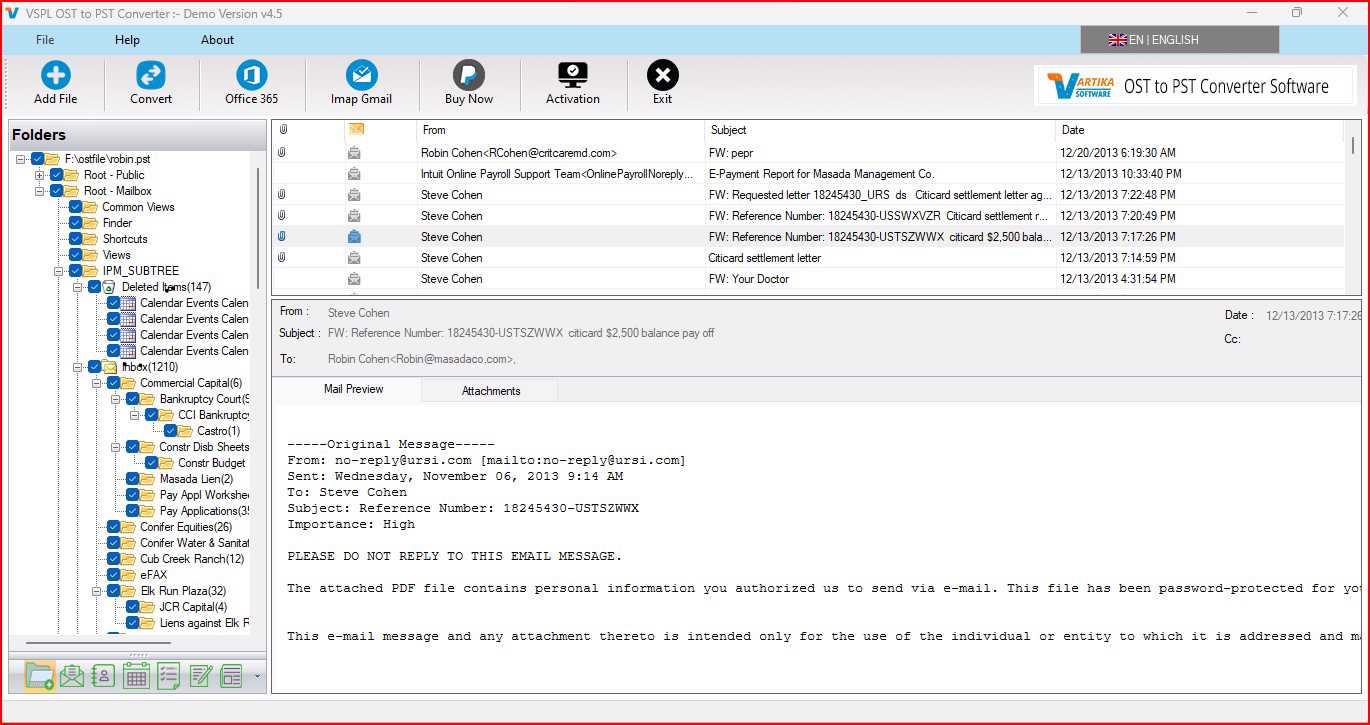
The first step in the conversion process is picking out the OST file that is available on the computer. The experienced converter will analyze the selected file and list the mailbox folders and the items found within the file.
The tool will scan the OST file and display a preview of the recovered data in the mailbox. The user will get a chance to view the folders and messages before extracting them, and therefore it becomes easy for them to locate the necessary data.
Recover Emails and Other Mailbox Items
OST files store not only emails but also a variety of data like contacts, calendar events, tasks, journals, notes, drafts, and even attachments. Thus, a program used for recovering OST files should be able to deal with all kinds of items that can be found in an Outlook mailbox.
VSPL OST to PST Converter Software is a program aimed at recovering OST components and keeping them safe during the export process. It also offers the possibility of saving the restored data in PST, EML, MSG, MBOX, HTML, PDF, ICS, vCard, and many other file formats.
Export OST Data Directly to PST
After scanning the OST file and viewing the data present inside, the user can use the export feature to recover the mailbox data. The software allows you to convert OST to PST without the need to install Microsoft Outlook in your system.
The generated PST file can be opened using a compatible Outlook application. The software is compatible with various versions of Outlook software such as Outlook 2021, 2019, 2016, 2013, 2010, 2007, and 2003.
Recover Corrupted or Inaccessible OST Files
One of the major factors that prevents users from accessing OST files is corruption. The OST file can get corrupted due to various reasons such as problems with synchronization, an accidental shutdown of the system, crashing of software, storage issues, and many other issues.
The Outlook OST converter will be able to detect the error and fix it, as well as scan the corrupted database to locate the mailbox data that can be recovered.
No Microsoft Outlook Installation Required
The biggest advantage of using such a method is the fact that Microsoft Outlook doesn’t have to be installed on the computer. Based on the product description, the tool converts the OST file to PST without having to install the Outlook program.
In this way, people who still have an old OST file but do not have access to their old Outlook account or Exchange account anymore won’t have to restore the account, as they will be able to scan the OST file and export available mailbox data.
Multiple Saving Options
At times, there is no requirement for the PST file itself from the users. They might need of the emails individually in EML or MSG format, the mailbox data in MBOX format, or the emails in HTML or PDF format.
Various saving options are available with this tool, such as PST, EML, MSG, MBOX, HTML, PDF, ICS, vCard, Gmail, Yahoo Mail, and Office 365/Microsoft 365. Thus, it offers more flexibility during the OST to PST conversion process.
Conclusion
An OST to PST conversion without using Outlook could come in handy in scenarios where the initial Outlook installation, Exchange account, or the user profile is missing. Rather than relying on Microsoft Outlook for accessing the mailbox, users can make use of a separate recovery tool that will scan the OST file, view its content, and then extract the information.
VSPL OST to PST Converter Software is one such recovery tool that can be used to recover emails and other mailbox content from any offline, damaged, or inaccessible OST file. The tool works with various Outlook versions, has options to export the data into different formats, supports a viewing feature, and does not need Microsoft Outlook to be installed for the conversion.
Convert OST to PST Without Outlook: A Safe and Simple Method Comments





