How to Transfer Lotus Notes Emails, Contacts and Attachments to Outlook
Lotus Notes is one of the most popular software tools used by various businesses for handling business emails, contacts, calendars,other types of communication-related data
Lotus Notes is one of the most popular software tools used by various businesses for handling business emails, contacts, calendars, and other types of communication-related data. Nevertheless, most businesses tend to opt for Microsoft Outlook nowadays due to the familiar user interface of this software, along with its ability to integrate with other Microsoft products. One of the main problems that companies encounter when switching from Lotus Notes to Microsoft Outlook is that these two software tools utilize different mailbox file types. Thus, while Lotus Notes saves its mailbox data in NSF files, Outlook uses PST files.
Why Move Lotus Notes Data to Outlook?
Transferring information from the NSF files into PST can become a tough job for you, particularly when your NSF files have many emails and attachments. There could be important emails and attachments like invoices, reports, documents, pictures, and many others that should be available even after the migration process. The vMail NSF to PST Converter will assist users in transferring this data from Lotus Notes to Microsoft Outlook without the need to move each email one by one. The converter will process the NSF mailbox and convert it to a PST file that can be accessed via Outlook.
One of the major objectives of using an NSF file to PST converter is to provide convenience in the migration process. Instead of processing each email individually, the required NSF file data can be processed and saved as a PST file that will be compatible with Outlook.
Transfer Lotus Notes Emails to Outlook
The content of email messages is usually the most important thing in any Lotus Notes mailbox. It may include information about client communications, company communications, projects, agreements, and much more. When migrating emails, it is not enough just to move the content of the message. It is necessary to transfer important attributes of the email like sender and recipient, the date of writing, subject line, and attachments. The process of converting NSF to PST is intended to transfer the content of the mailbox along with other supported information.
If a lot of email messages are saved in one NSF file, then the manual transfer of all these emails will take too much time. An automatic NSF file conversion tool helps users process mailbox data more easily and prepare it for further work in Microsoft Outlook. The NSF to PST conversion approach can make the migration more organized and reduce the effort required to move a large amount of mailbox data.
Preserve Lotus Notes Attachments
Attachments can make the migration process more difficult as well. One email can have multiple attachments which could be necessary for referencing later. With the help of the Lotus Notes NSF to PST converter tool, users can migrate emails with their attachments as well. It is particularly crucial in case the organization relies on its business documents.
Most of the time, business emails include contracts, invoices, presentations, spreadsheets, pictures, and other documents. Having them attached to the original email would help the user refer to old correspondence better. They can check if all important emails and attachments were migrated.
Transfer Lotus Notes Contacts
Another vital category of information that might need to be migrated from Lotus Notes to Outlook is contacts. Contacts like customer contact information, supplier contacts, employee contact information, and so forth, usually form part of an individual’s business email. It would only cause unnecessary additional effort to lose such information through the migration process.
Conversion tool can help you in migrating all the supported information including contacts alongside other email account data to make the whole process easier. Having both emails and contacts together will help in maintaining regular communication by your organization.
Simplify NSF to PST Migration
The conversion from NSF to PST comes into play when companies have large NSF files. Copying such a huge number of emails manually takes a lot of time and can increase the probability of losing data. An automated way can do everything in an organized fashion and enable users to select the necessary data for creation of the PST file.
Also, selective conversion will be helpful if the users just wish to transfer some specific folders and not the entire NSF mailbox. The NSF to PST conversion process can therefore be useful for organizations that want better control over the mailbox data they migrate.
Features That Make Migration Easier
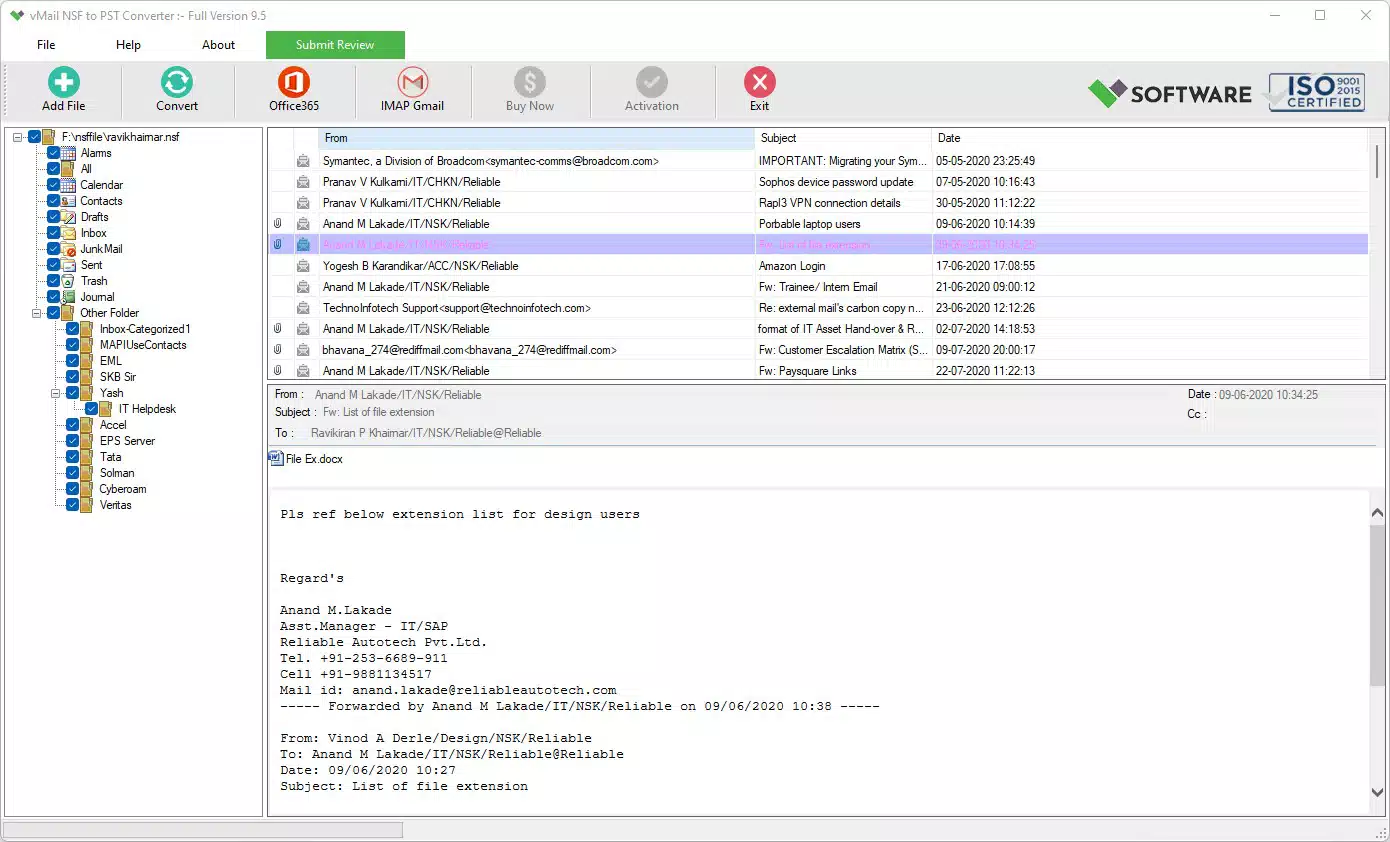
The vMail NSF to PST Converter offers capabilities that are aimed at easing the process of migrating Lotus Notes mailboxes. Users have the ability to import NSF files into the tool and preview the information contained in the mailbox before its migration. Previewing the mailbox information will help the user review emails and other compatible files and determine what type of information should be migrated. It may come in handy, especially when dealing with big mailboxes, whereby the user can determine the needed folders and data to export.
Moreover, the vMail application works with several versions of Lotus Notes and Microsoft Outlook. Apart from the PST format, users can choose other options for exporting Lotus Notes mailbox information depending on their needs. Nonetheless, the PST format is still practical where the aim is to view the information from the Lotus Notes mailbox via Microsoft Outlook. An NSF file to PST converter can make this process easier by providing an organized way to prepare Lotus Notes mailbox data for Outlook.
Maintain Mailbox Folder Structure
Another feature that will make using the software easier is the possibility of keeping the mailbox folder hierarchy while converting it. The user will have an opportunity to use folders like Inbox, Sent Items, Drafts, as well as other custom folders that he/she used in the previous email system when searching for old emails.
With a well-structured PST file, the user will be able to work with his/her old mailbox information without having to create it all over again. This helps maintain a familiar organization of the mailbox after migration.
Export NSF Data for Outlook
The converter is also helpful in case a person needs to export NSF to PST in order to archive information. For instance, one might consider making copies of his Lotus Notes email folders since he decided to shift his communication tool from Lotus Notes to Outlook. Thus, converting NSF files to PST files could become a good way of keeping the old emails and attachments in Outlook-compatible form.
The utility for converting NSF file to PST could thus come in handy for not only individuals but also companies that wish to migrate from Lotus Notes. Rather than using some complicated manual methods of processing NSF files, people will be able to use an automatic program, look through all the available information, choose needed mailbox items, and export NSF to PST.
Conclusion
Converting NSF to PST must ensure not only that the files change their formats but also the usability of mailbox contents remains. It means that emails should be arranged, attachments should stay attached to corresponding emails, and supported contacts should stay accessible after conversion.
To sum up, the transfer of Lotus Notes emails, contacts, and attachments to Outlook is quite a difficult task due to the difference in mailbox formats. The use of a Lotus Notes NSF to PST converter will facilitate the migration process since it will enable the conversion of NSF mailbox contents into PST mailbox format and provide the possibility of previewing and selective processing of information. Users who want to convert NSF to PST can utilize an automated converter in order to perform such migration.
How to Transfer Lotus Notes Emails, Contacts and Attachments to Outlook Comments





