How to Recover an Inaccessible OST File and Convert It to PST
Microsoft Outlook makes use of OST files for storing the synchronized copies of mailbox data when the account is synchronized with an Exchange ServerMS 365.
Microsoft Outlook makes use of OST files for storing the synchronized copies of mailbox data when the account is synchronized with an Exchange Server or MS 365. These files can include important emails, attachments, contacts, calendar, tasks, notes, journal, and many more types of mailbox items. Sometimes, an OST file may become inaccessible due to some technical problem related to corruption, synchronization, Exchange Server, deletion, or any other technical issue. In such a case, it becomes important to recover the data stored in this OST file.
One effective way of recovering the data from such an inaccessible OST file is to make use of VSPL OST to PST Converter Software that is specifically made to scan and recover the mailbox items from inaccessible and corrupted OST files into an accessible format. This software is capable of recovering data from offline and corrupted OST files as well and exporting it to PST format for Outlook, along with many other formats.
Why Does an OST File Become Inaccessible?
There could be various reasons for an OST file to stop working or become inaccessible. There could be various error messages displayed by the Outlook application due to corruption of the OST database or failure of synchronization with the Exchange Server. The reasons could also be a sudden shutdown of the system, a crash of the program, disk drive issues, huge mailbox databases, or failure in the synchronization process.
Sometimes the Exchange account could become unavailable, and valuable data could remain in the offline OST file. An OST file cannot be accessed easily as it is not meant to be accessed like a PST file, and the only way to do that is to have an OST converter to PST.
Recover Inaccessible OST Data
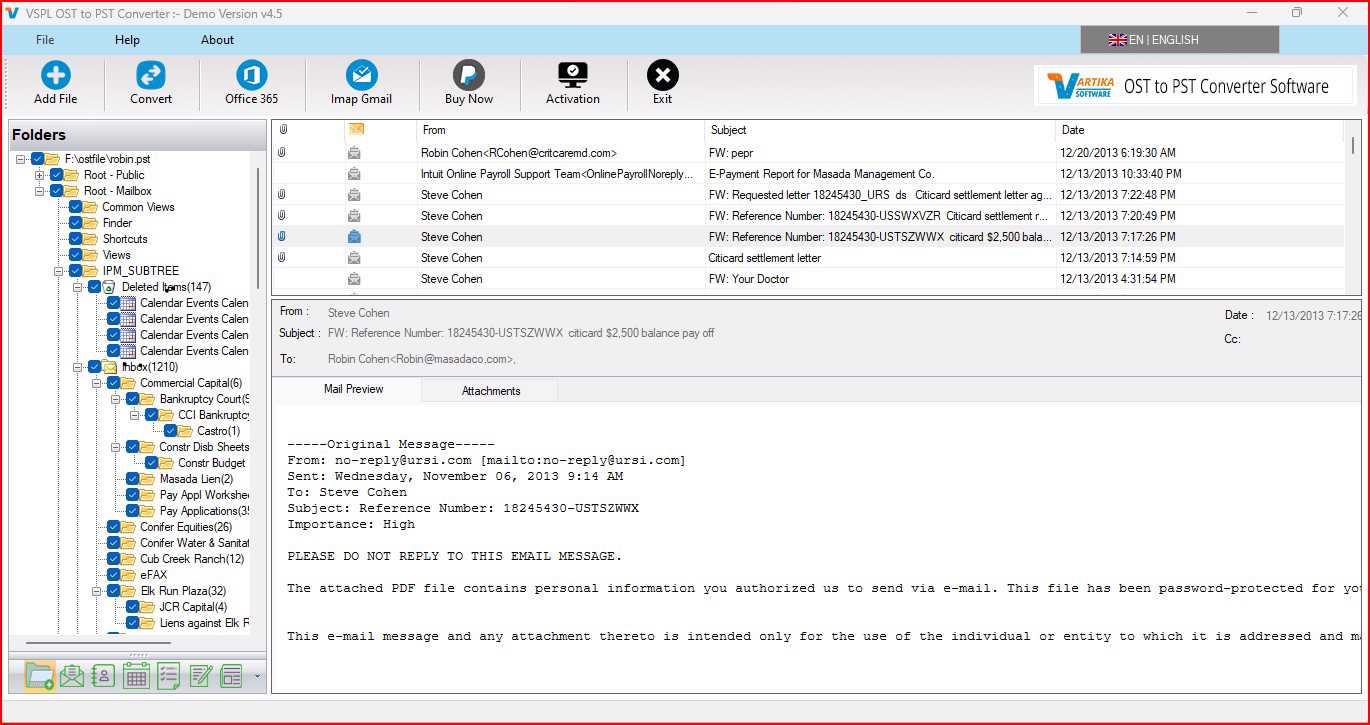
In case of any problem with accessing an OST file, the initial step must be the recovery of the data from that file without modifying the file itself. With the use of an expert recovery tool, it is possible to scan the OST database for all the available mailbox items and list them out for export of recovered data.
The feature of previewing the recovered mailbox components makes it easier to find the desired emails and mailbox components with the help of VSPL OST to PST Converter Software. This tool helps to recover emails, attachments, calendar, contacts, tasks, journal, notes, drafts, and other OST components.
Convert OST Data into PST Format
After extracting the data from the OST file into the mailbox, users can easily perform conversion from OST to PST conversion format to read the data through Microsoft Outlook. PST is among the most widely used data formats in Outlook and can be viewed through compatible Outlook versions.
Such a conversion process allows users to retain essential mail attributes. Users just have to select the OST file, let the software scan the selected file, preview the data present in the mailbox, and then convert OST to PST format. Such software is compatible with Outlook versions including 2021, 2019, 2016, 2013, 2010, 2007, and other compatible versions.
Preserve Emails and Other Mailbox Items
A primary issue when OST recovery is performed is the question of availability of critical mailbox information after the conversion process. A good Outlook OST converter must be able to recover not only email messages but also attachments, contacts, calendars, tasks, notes, journals, drafts, inbox messages, and other folders that might be present.
The program is designed to recover various components of an OST mailbox and offer several ways of saving data. In addition to PST, users have the possibility to save the recovered information in EML, MSG, MBOX, HTML, PDF, ICS, vCard, and other supported file formats.
Recover Corrupted and Password-Protected OST Files
An OST file could prove hard to open due to reasons relating to either corruption or security. In situations like these, accessing the file manually cannot assure the user of success in recovering the contents of the mailbox. The program is designed to detect errors and also repair OST files.
The software provides the capability to recover from password-protected OST files. The recovered information can be saved to a new PST file. This is helpful if one needs to recover mailbox data from an inaccessible or corrupt database.
No Need to Install Microsoft Outlook
Other notable advantages include the fact that this process does not need Microsoft Outlook to be present on the system. This may be handy when one uses the computer without having the program installed but has valuable data stored in an OST file.
One has an easy way to scan the OST file and then preview the file content and save it. This means that one can convert OST to PST without the presence of Outlook on the system.
Multiple Export Options for Recovered Data
Recovery requirements for OST file can vary from one person to another. Some may require the whole mailbox in PST format, but some may need particular emails in EML/MSG formats. There might be some who may require PDF or HTML in order to access their emails without any email client application.
OST file recovery to PST provides multiple saving options such as PST, EML, MSG, MBOX, HTML, PDF, ICS, vCard, or exporting Office 365/Microsoft 365 mailbox.
Conclusion
An inaccessible OST file does not automatically imply that the mailbox information stored within the file is gone forever. Through proper use of a recovery tool, users can scan an inaccessible database, preview the available mailbox contents, and export the information in another form. The VSPL OST to PST Converter Software gives a convenient solution for recovery of damaged OST file information into PST and other formats.
Depending on the requirement, whether one is converting an OST file to PST, recovering email from a damaged file, or exporting mailbox contents into another environment, this software gives users various options of recovery and exporting. Its support for various versions of Microsoft Outlook, preview capability, availability in various formats, and working without Microsoft Outlook makes it ideal for recovering important OST mailbox information. OST to PST conversion can help users access their recovered mailbox data more conveniently.
How to Recover an Inaccessible OST File and Convert It to PST Comments





