How to Efficiently Convert PST Files to EML Format: A Step-by-Step Approach
Converting emails from Outlook to another email client supporting EML format can be a tough task indeed. Users usually tend to change their email clients from Outlook to any other email clients Windows Mail, Thunderbird, Live Mail,Apple Mail, wherei
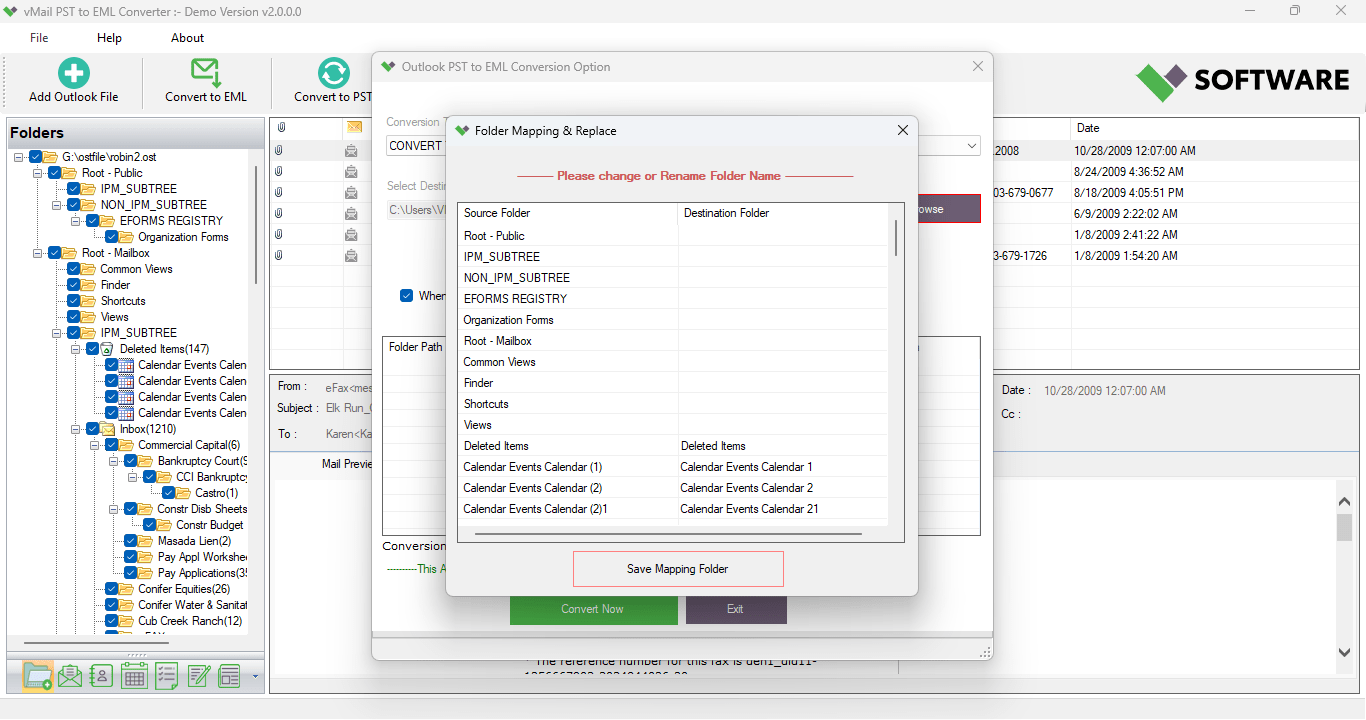
Converting emails from Outlook to another email client supporting EML format can be a tough task indeed. Users usually tend to change their email clients from Outlook to any other email clients like Windows Mail, Thunderbird, Live Mail, and Apple Mail, wherein EML format is considered to be the preferred file format. In such cases, using an effective solution for PST to EML conversion is very much required to make sure emails are well preserved.
There are various tools available in the market that assist in the task of PST to EML conversion, but vMail PST to EML Converter is one of the best and most efficient tools used for professional conversion. This tool is developed specially to facilitate migration of emails from Outlook in EML format while maintaining all important aspects of emails like attachments, metadata, folder structure, and email formatting intact.
Here we will discuss some aspects related to the task of PST to EML conversion along with the challenges involved in manual approach.
Understanding PST and EML File Formats
PST or Personal Storage Table is the usual type of data file used by Microsoft Outlook to store emails, contact details, calendars, notes, journal, and other mailboxes. As PST files can be used only within Microsoft Outlook software, reading those files in any other email client would create lots of problems.
On the other hand, EML file stores all attachments along with an email in a single file. It is widely supported by many email clients and, hence, is very useful for email migration, backing up, and emailing.
This is just one of the many differences that make people search for an outlook to EML converter to convert outlook to EML files easily.
Why Do Users Need PST to EML Conversion?
There are many benefits associated with migration of Outlook to EML file formats:
- Migrating emails from Outlook to other email applications.
- Back up email separately.
- Archiving critical emails in a compatible format.
- Sharing emails without having Outlook.
- Reading Outlook emails even if the software is not available.
Be it an end user or an IT professional, using an effective outlook to EML converter helps make the migration much simpler.
Why Choose vMail PST to EML Converter Software?
The vMail PST to EML Converter is a professional tool appropriate for all types of users, from technical to non-technical. It has an easy interface and uses advanced conversion technology that converts each email securely.
As compared to manual processes, where different tools and considerable time are needed, this tool makes the entire process to convert PST to EML very easy.
Key Features of vMail PST to EML Converter Software
Conversion of Multiple PST Files Together
One of the main strengths of vMail PST to EML Converter software is that it converts multiple PST files in one go. As opposed to converting one email Outlook file at a time, now you can load multiple Outlook PST files to convert together.
The feature is beneficial for those who deal with large amounts of Outlook data and need quick PST to EML conversion.
Keeps the Folder Hierarchy Intact
While carrying out the PST to EML conversion, maintaining the folder hierarchy is very important. The software keeps the folder hierarchy intact, just the way it is there in Outlook, enabling users to find emails easily after conversion. None of the folders are renamed or misplaced during the conversion process.
Preserves Email Formatting
Email formatting is quite essential when it comes to professional emailing. vMail PST to EML Converter software preserves the following things about emails:
- HTML formatting
- Rich text formatting
- Fonts
- CSS colors
- Hyperlinks
- Image files
- Attachments
Export PST to EML with Attachments
Attachments can be considered the most valuable content in the email. Irrespective of whether you have documents, spreadsheets, presentations, pictures or PDFs in your emails, this tool will export PST to EML along with all attachments. There is no necessity to save the attachments separately post conversion.
ANSI and Unicode PST File Support
Data stored in Outlook is saved in ANSI and Unicode PST format depending upon the version of Outlook. This vMail PST to EML Converter supports both formats of PST files.
Previews Prior to Converting
The program allows previews of the mailbox prior to any conversions.
A user can view different folders and check the emails to ensure that all the needed data is in place before exporting them to EML format. Such actions decrease errors and increase efficiency.
Selectively Convert PST to EML
There may be cases when one does not require converting the whole mailbox. Conversion of a certain part of a mailbox is made possible through the selective email conversion feature of the program. This allows users to convert PST to EML according to their specific requirements.
Converts Large PST Files
Large PST files in Outlook generally cause issues during manual conversion. vMail PST to EML Converter is able to convert big PST files without any effect on the speed or data quality of conversion. Therefore, it can be used for migration of emails at the enterprise level.
Easy User Interface
The user interface of this software is very easy to use. Users, even without having any technical knowledge, can easily convert PST to EML files with just a few clicks.
vMail PST to EML Converter Benefits
Some of the benefits of using vMail PST to EML Converter include:
- Quick conversion process
- Effective and safe migration
- Email attributes preserved
- Email attachments preserved
- Works well with big PST files
- Batch conversion feature
- Ensures no loss of data
- Easy-to-use software
- High accuracy of emails migration
- Consistent performance
Manual Method versus Professional Software
The manual procedure of converting PST to EML format is usually very complex and involves installing Outlook application, using different applications and taking much time. Moreover, there are additional risks of data loss, formatting problems and incomplete migrations.
On the contrary, the use of vMail PST to EML Converter allows automation of the whole process in 100% accurate manner. The tool lets users convert PST to EML, convert outlook to EML, and export PST to EML within several clicks without the fear of losing any attachment or changing formatting.
Conclusion
In case of finding the most effective way to convert PST to EML, the best thing to do would be using professional software. All of the requirements for successful email conversion could be met by using vMail PST to EML Converter – batch conversion, attachment moving, folder structure preserving, large PST file handling and user-friendly interface.
For both individual users who want to move their personal emails from Outlook or organizations that need to handle enterprise mailbox data, the outlook to EML converter becomes the great solution. Using this outlook to EML converter, one may easily and reliably convert outlook to EML and export PST to EML.
How to Efficiently Convert PST Files to EML Format: A Step-by-Step Approach Comments