Outlook Duplicate Eraser - Boost Productivity with a Cleaner Inbox
The management of Microsoft Outlook data tends to get more complicated with the increasing size of your mailbox over time
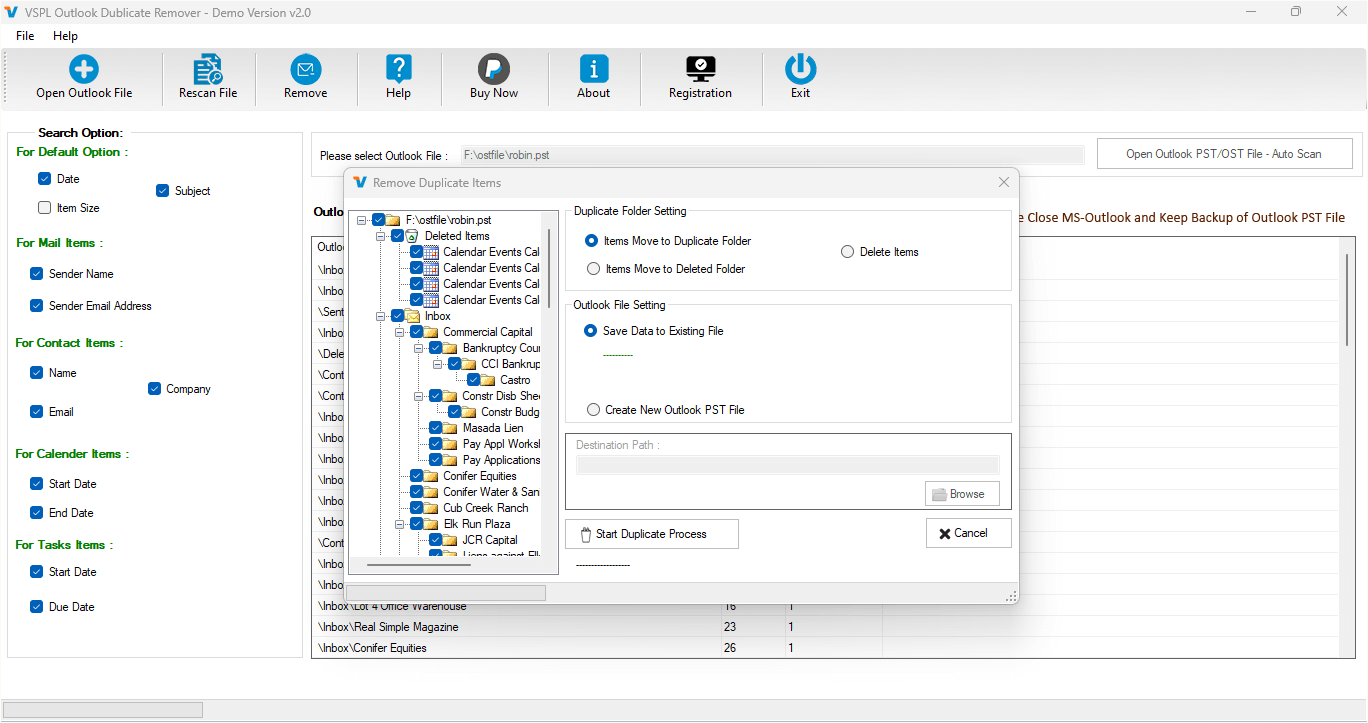
The management of Microsoft Outlook data tends to get more complicated with the increasing size of your mailbox over time. Among some of the very common issues that people working with Microsoft Outlook face, the problem of duplicate emails, contacts, calendars, tasks, journal, and notes comes on top of the list. The presence of duplicate items not only consumes up your precious space but also makes it difficult for you to organize and manage important information conveniently. When you find repeated data in your Microsoft Outlook mailbox, it will certainly have an impact on your routine work and decrease your productivity. In such a situation, it would be beneficial for you to use the VSPL Outlook Duplicate Remover Tool.
Why Duplicate Items Appear in Outlook
Duplicate Outlook objects are far more widespread than what most users think. This problem can arise due to a variety of reasons like multiple synchronization activities, repeated import of the same PST file, restoration of mailbox backup, issues with Outlook synchronization, wrong migration, and merging of several Outlook data files. In the majority of companies, users face the issue of receiving duplicate emails after mailbox migration and synchronization with Exchange Server, Office 365, and IMAP accounts.
With time, these duplicate items occupy extra space and cause Outlook to function more slowly. It becomes hard to find the necessary email as many duplicate entries are shown in the search results. Contact lists get messy; calendars get repeated events; and task duplication can cause scheduling problems. Thus, the use of a professional Duplicate Email Remover is very necessary.
How Duplicate Outlook Items Affect Productivity
Initially, duplicated emails do not appear to be much of a problem; however, as the size of the mailbox grows, the effect will become more significant. The performance of Outlook deteriorates because the program is forced to analyze additional information in the form of duplicates each time it is run.
Employees have to waste their time in searching for the appropriate email among several copies of the same one. Big PST files are even more likely to get corrupted since they grow unnecessarily with duplicate information stored within them.
The backup process takes more time, as well as the migration of mailboxes, increasing storage costs. Using an efficient Outlook Duplicate Remover helps resolve these problems.
Why Choose VSPL Outlook Duplicate Remover Tool?
VSPL Outlook Duplicate Remover Tool is an efficient tool that has been created to remove duplicates in Outlook without causing any damage to original data. This powerful tool automatically scans Outlook PST files and detects duplicate email messages using several comparison parameters. Thus, there is no need for users to scan thousands of emails and manually remove duplicates, as everything will be done in minutes.
The tool enables users to perform the removal of duplicates in all kinds of Outlook data – emails, contacts, calendars, journals, notes, and tasks. Moreover, the user is able to specify duplicate criteria according to which duplicates will be detected, and no valuable data will be removed by mistake.
What makes this Outlook Remover Tool one of the best is its ability to keep the data fully intact during the whole removal process.
Intelligent Duplicate Detection for Accurate Results
However, all mails which appear to be alike are not necessarily duplicate emails. A professional duplicate detection process needs intelligent comparison algorithms to compare different parameters of an email before calling it duplicate.
The Outlook PST File Duplicate Email Remover uses different parameters for comparison, such as subject, sender, receiver, attachment, date sent, date received, message body, and many other Outlook parameters. The user has the freedom to set these comparison parameters as per their choice.
Such an advanced comparison process results in fewer false detections and protection of critical mailbox data without making any mistakes.
Remove Duplicate Emails from Multiple PST Files
Most users keep several Outlook PST files in order to categorize them according to various projects or departments. It is not possible to manage duplication between these PST files manually.
With the help of the VSPL Outlook Duplicate Remover Tool, users can process multiple PST files with ease. Whether the duplicate emails are found in the same PST file or in different PST files, the tool will do its job of scanning and removing all unnecessary duplications.
This is a very helpful feature for the organization during Outlook migration.
Supports All Outlook Mailbox Items
Unlike other typical duplicate removal programs that concentrate solely on emails, the Duplicate Email Remover is capable of dealing with all essential elements of the Outlook mailbox.
This utility is able to eliminate duplicate emails, contacts, calendars, appointments, journals, notes, and tasks. Thanks to this versatility, the whole Outlook mailbox will be cleaned from duplicates rather than just one type of them.
Duplicate contacts or calendar appointments may cause misunderstandings during meetings and communication with clients. It is very important to remove all duplicate items from Outlook.
Preserve Folder Hierarchy and Original Data
Data security is one of the topmost issues that are raised when it comes to maintaining Outlook. People generally do not like removing duplicates because they are concerned about their valuable data.
The Outlook Duplicate Remover takes utmost care of all the original folders as well as the structure of emails, making sure that nothing gets deleted except for the duplicates.
The Outlook Duplicate Remover works only on duplicates and leaves other data untouched.
User-Friendly Interface for Every User
Every user who uses the Outlook application does not necessarily have to be technically knowledgeable. This is because the VSPL Outlook Duplicate Remover Tool provides an easy and friendly user interface, which allows all types of users to easily remove duplicates from their Outlook account.
All that a user needs to do is choose an Outlook PST file, set up duplicate comparison parameters, select folders to scan for duplicates, view duplicates, and start the removal procedure.
Selective Folder Processing Saves Time
Not all users have to scan their complete mailbox each time. Often, there may be duplicate files only in selected folders such as Inbox, Sent Items, Deleted Items, or Archive folders.
Outlook Remover Tool offers the option of selected folder processing, which means users can scan their chosen Outlook folders only. This will save a lot of time in the scanning process as well as in removing duplicates.
Users with huge Outlook archives find it very useful.
Preview Duplicate Items Before Removal
Another benefit associated with the VSPL Outlook Duplicate Remover Tool is the availability of a preview feature. The user has the opportunity to see duplicates that have been discovered by the tool prior to their permanent deletion.
The extra step ensures that no mistakes are made when it comes to deleting Outlook duplicates. Users retain total control throughout the whole process.
Compatible with All Major Outlook Versions
Organizations often have different versions of Microsoft Outlook running at the same time. Compatibility becomes one of the vital features of any Outlook management tool.
The Outlook PST File Duplicate Email Remover works with PST files that are created in different versions of Outlook, such as Outlook 2021, 2019, 2016, 2013, 2010, 2007, and other supported versions. The tool also supports ANSI and Unicode PST files.
This application works smoothly under different Windows platforms.
Safe and Reliable Duplicate Removal
Professional mailbox cleanup must be reliable in all aspects. While doing duplicate deletion, the program does not make any changes to the original Outlook data. The program just analyzes the information stored in mailboxes and deletes duplicates based on criteria selected by the user.
Such an approach guarantees that the Duplicate Email Remover is appropriate for a business environment.
Optimization of Outlook operation will not affect business correspondence.
Improve Outlook Performance and Storage Efficiency
Deleting duplicates in Outlook will bring about several benefits right away. This is because smaller PST files open up faster; Outlook searches become faster; the synchronization process goes smoothly; and backup processes consume less disk space.
The benefit of having a neat mailbox is increased efficiency in terms of work for employees since they will not be spending much time looking for emails and organizing their folders. The Outlook Duplicate Remover helps in achieving this.
In cases where companies have big Outlook archives, removing duplicates from the mailboxes will be of great significance to them.
Conclusion
Duplicate Outlook Items can seem harmless at first glance but will end up causing Outlook to slow down and use up space as well as creating confusion in daily activities. Manual removal of duplicate emails, contacts, calendar items, and any other Outlook items is cumbersome and inefficient.
The VSPL Outlook Duplicate Remover tool offers the perfect means by which to remove duplicate Outlook data without harming the original mailbox contents. With features such as duplicate detection, the ability to handle all types of Outlook items, preview options, selective folder handling capabilities, maintenance of folder structure, compatibility with various Outlook editions, and safe processing technology, it is the perfect Outlook PST File Duplicate Email Remover for personal and professional Outlook users.
For those of you who need to remove duplicates from your Outlook file in a safe manner and optimize the mailbox, this Outlook Duplicate Remover comes in very handy.
Outlook Duplicate Eraser - Boost Productivity with a Cleaner Inbox Comments





